
Download Purple Pen for Orienteering – orienteering, course design, map editing, control points, navigation, path planning, GPS, course creation, route design, map tools
Overview
Purple Pen for Orienteering is a specialized mobile application designed to support course designers in the creation and refinement of orienteering routes and control point placements. The app streamlines the process of designing competitive and fair orienteering courses by offering tools tailored to the unique demands of map-based navigation challenges. It serves as a digital companion for event organizers, club coordinators, and experienced orienteers who need to plan precise, well-structured courses.
By integrating with established mapping formats, the app ensures compatibility with widely used platforms in the orienteering community, such as OCAD, OpenOrienteering Mapper, and PDF-based maps. This makes it a valuable asset in the workflow of professionals and enthusiasts alike. The application is particularly useful for preparing courses that require accurate distance measurements, clear route logic, and consistent control point labeling.
It addresses the challenges of manual course design, which often involve time-consuming adjustments and potential inconsistencies. With a focus on usability and precision, Purple Pen for Orienteering enhances the efficiency and reliability of course preparation. The developer did not provide additional technical details about the app’s development background or prior versions.
However, its release in 2024 marks a significant step toward digitizing and modernizing course design workflows in the orienteering ecosystem.
Key Features & Functionality
- Integrated Map Support: The app supports direct work with OCAD, OpenOrienteering Mapper, and PDF formats, enabling seamless course design on established maps. This compatibility allows users to import existing maps without format conversion, reducing workflow friction.
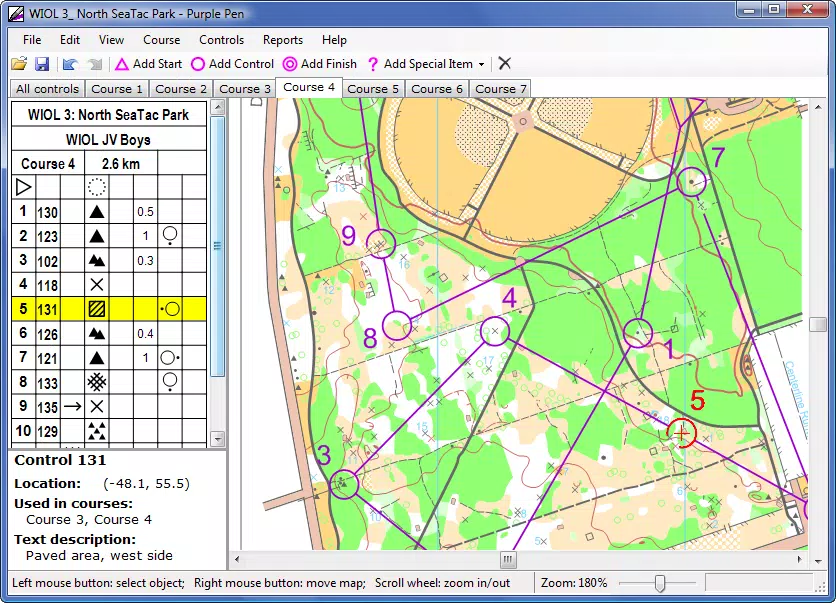
- Simultaneous Viewing: Users can view course layouts and control descriptions side by side, enabling real-time verification and adjustments. This feature improves accuracy and reduces the need for back-and-forth navigation between separate tools.
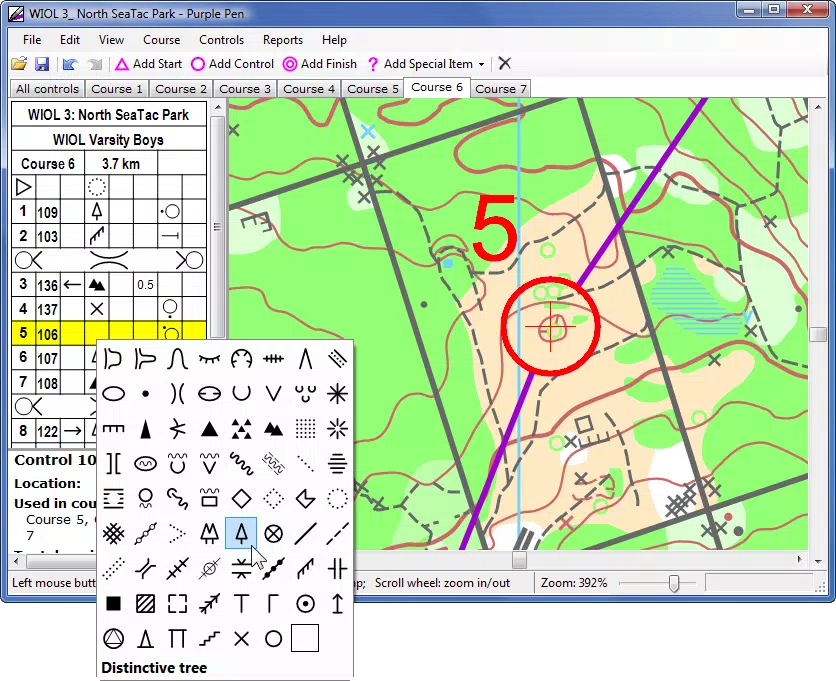
- Automated Descriptions: Control descriptions are generated and updated automatically based on user inputs, minimizing manual entry and reducing the risk of typographical or logical errors during course setup.
- Visual Design Interface: The interface is designed to be intuitive and visually oriented, allowing users of varying experience levels to plan courses efficiently. Tools are arranged logically, with visual cues that guide the placement of control points and routes.
For example, a course designer preparing a beginner-level orienteering event can import a PDF map, place control points using the visual tools, and instantly generate labeled descriptions that reflect the terrain and route complexity. The automated system ensures consistency across all control points, which is critical for maintaining fairness in competitions. Similarly, advanced users can leverage the app’s integration with OCAD to export designs for further refinement in desktop software. These features collectively reduce the time required for course preparation while enhancing precision and clarity.
Interface, UX & Performance
The user interface of Purple Pen for Orienteering is structured around visual clarity and task efficiency. Navigation is streamlined through a clean layout that prioritizes core functions such as map import, control point placement, and description management. The visual design emphasizes usability, with clearly labeled buttons, intuitive gestures, and consistent iconography.
The app appears optimized for touch interaction, making it suitable for use on smartphones and tablets. Although the developer did not list formal performance metrics, the app’s 15.7 MB file size suggests a lightweight design that should run smoothly on a wide range of Android devices. The application is expected to maintain responsiveness during map rendering and real-time adjustments, especially when working with high-resolution PDFs or vector maps.
Stability is likely enhanced by the focus on core functionality rather than extensive background processes. The app’s performance on older devices or low-memory environments was not disclosed. However, the minimal size and targeted use case indicate a focus on reliability and quick startup times.
Users can expect consistent behavior during course creation, with minimal lag during interactive tasks. The overall user experience is designed to reduce cognitive load, allowing course designers to focus on creativity and precision rather than technical navigation.
Platform Compatibility & Technical Requirements
Purple Pen for Orienteering is available exclusively on the Android platform. The current version is 1.0.2, with a file size of 15.7 MB. The app is offered at no cost, making it accessible to a broad audience of orienteering enthusiasts and organizers.
The developer did not specify minimum OS requirements or device compatibility details. As such, users should ensure their Android device meets standard app installation criteria. Compatibility with specific Android versions or hardware configurations was not disclosed.
The app’s lightweight nature suggests it may function on devices with moderate processing power and memory. However, optimal performance may depend on the resolution and file size of the maps being used. Users are advised to test the app with their preferred map formats before relying on it for critical course design tasks.
The lack of detailed technical specifications means that compatibility with older or newer Android versions remains uncertain. Nonetheless, the app’s free availability and focused feature set make it a low-risk option for trial and evaluation.
Pros and Cons
- Free to download and use, reducing barriers to entry for new course designers
- Supports multiple map formats, enhancing flexibility in workflow
- Offers simultaneous viewing of course layouts and control descriptions for improved accuracy
- Automated control descriptions reduce manual input and error risk
- Intuitive visual interface suitable for users of varying skill levels
- Lightweight design with a small file size (15.7 MB)
- Specific OS requirements were not listed, limiting clarity on device compatibility
- Platform availability is limited to Android only
- No information provided about offline functionality or cloud sync
- Developer did not disclose update frequency or future roadmap
- Performance on low-end devices remains unverified
FAQ
Is Purple Pen for Orienteering available on iOS?
The app is currently only available on the Android platform. No information is available about future iOS release plans.
Can I use Purple Pen for Orienteering without an internet connection?
The app may function offline for basic course design tasks, but the developer did not specify whether all features are available without internet access.
What map formats does Purple Pen support?
The app supports OCAD, OpenOrienteering Mapper, and PDF formats, allowing users to work with established mapping tools and files.
How often is Purple Pen for Orienteering updated?
The developer did not disclose the update frequency or release schedule for future versions.
Is the app secure for storing course designs?
While the app is free and appears to handle data locally, no official information was provided about data encryption, cloud storage, or privacy policies.
Final Thoughts
Purple Pen for Orienteering delivers a focused, efficient solution for course designers seeking to simplify the creation of orienteering routes and control points. Its integration with standard map formats, combined with automated features and a clean visual interface, makes it a practical tool for both newcomers and experienced users. The app’s lightweight design and free pricing model enhance its accessibility, allowing clubs and individuals to adopt it without financial or technical barriers.
While platform exclusivity to Android and limited technical details may restrict broader adoption, the app’s core functionality addresses real pain points in course preparation. For orienteering event organizers, coaches, and dedicated enthusiasts, Purple Pen offers a modern, reliable way to design fair and engaging courses. Its ability to reduce manual effort and improve accuracy adds tangible value to the planning process.
The app fills a niche in the productivity space by combining map editing, navigation planning, and route design into a single, streamlined tool. Download Purple Pen for Orienteering now.


